OBJs suck and are such a damn pain for mod development.
But maybe I can help you out, with what I learned from 10 hours of debugging one freaking model.
Making a block!
So step one is to register your block. Don't even worry about the model, because you gotta have a block for it. Luckily, this is somewhat
straight-forward. You are going to need a ModBlocks class, as well as a class for your block. For this example, I will just be using
the block I set up, which is FatManNuke. Next, setup your block class, or FatManNuke in this example. Here is the code for it,
I will explain everything after:
public class FatManNuke extends Block {
    public FatManNuke(Properties properties) {
        super(properties);
    }
}
This is super simple. This is just the class for the block in game. The only time you wouldn't need a class for the custom block is if you have no special logic for that block. This is unlikely, unless you are making something like a steel block which has no custom logic, and only needs basic vanilla block behaviour. But likely, if you are using a custom OBJ model, then you will be needed custom defined behaviour. You can check out my full FatManNuke file at the end of this page.
You got a block, now what?
Now that you have a block, you need to register it. Basically tell Forge/Minecraft that "Hey, I made a block. Put it in the game." To do that, just set up a class like so, under the same package that your block class is under.
public class ModBlocks {
    public static final DeferredRegister BLOCKS = DeferredRegister.create(ForgeRegistries.BLOCKS, SpikesNukesMod.MOD_ID);

    public static final RegistryObject FAT_MAN_NUKE = BLOCKS.register("fat_man_block",
            () -> new FatManNuke(BlockBehaviour.Properties
                    .copy(Blocks.OBSIDIAN)
                    .strength(1.5f)
                    .sound(SoundType.STONE)
            )
    );

    public static void register(IEventBus eventBus) {
        BLOCKS.register(eventBus);
    }
}
And thats it! All you gotta do here is make a DeferredRegister, which is basically a container that you fill up with stuff to register,
and then at the end batch register everything in the container. Hence the 'deferred' part of it. As for the RegistryObject, that is just the behaviour for
the block. .copy takes in a block from Blocks, and copies most of its behaviour. .strength is the strength, and
.sound is the sound, like breaking/placing. There are a zillion other properties you can give it, but I just chose these three for simplicity.
However, if you are making a big mod with lots of blocks, having all these properties in the ModBlocks class will pollute it, quickly. Especially if those
blocks have lots of properties. In this case, you can actually move the BlockBehaviour.Properties data to the blocks class:
public class FatManNuke extends Block implements EntityBlock {
    public static final BlockBehaviour.Properties PROPERTIES = BlockBehaviour.Properties
            .copy(Blocks.OBSIDIAN)
            .strength(1.5f)
            .sound(SoundType.STONE);

    public FatManNuke() {
        super(PROPERTIES);
    }
}
The basis of it is that you remove the constructor paramater for the block, and feed its super the PROPERTIES you defined. Then you new ModBlocks would look like:
public class ModBlocks {
    public static final DeferredRegister BLOCKS = DeferredRegister.create(ForgeRegistries.BLOCKS, SpikesNukesMod.MOD_ID);

    public static final RegistryObject FAT_MAN_NUKE = BLOCKS.register("fat_man_block", FatManNuke::new);

    public static void register(IEventBus eventBus) {
        BLOCKS.register(eventBus);
    }
}
Now that looks a lot cleaner.
Giving your object an OBJ
Now you can place your block into minecraft with /setblock ~ ~ ~ modid:block_id. But as of now, your block will just be a, well, block. And it
will have that awful missing texture, or the pink and black checkerboard. The one you commonly see in GMod. So to fix this, you have to give it a model
and texture. So go into your favorite modeling software that definetely doesnt make you want to shoot your self in the head (Blender), and make a model. Then,
export it as an OBJ file, along with its mtl file (this will be created automatically when exporting as OBJ). Now listen very carefully for this step, or else
you are going to spend hours debugging, guaranteed. You need to setup a structure just like this:
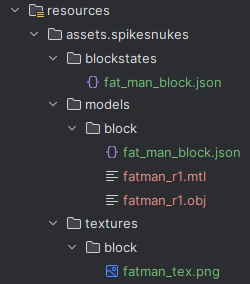
You first need a .json file in the blockstates folder in your mod's resources directory. This json MUST HAVE THE SAME FILE NAME AS YOUR BLOCKS ID. Then, you need to put your obj and mtl file, as well as another json file inside of models/blocks. Again, the JSON must have the SAME FILE NAME AS YOUR BLOCKS ID. Lastly, you need to put your models texture(s) under textures/block, and ensure they are PNG because thats what Forge likes best.
JSON and MTL Setup
Now all your resource files are in place. Great. Next, you need to fill in the JSON file and make a slight edit to the MTL file. In your json file under the blockstates/ folder, put this in:
{
    "variants": {
        "": {
            "model": "spikesnukes:block/fat_man_block"

        }
    }
}
And then the json in your models/blocks is going to be:
{
    "loader": "forge:obj",
    "model": "spikesnukes:models/block/fatman_r1.obj",
    "flip-v": true
}
Now lucky for us, nothing ever works the way you want it to in mod development, so likely flip-v won't do anything, no matter if its true or false. What it is supposed to do (when set to true) is flip the UVs do that you don't have an upside down texture. But, it doesnt. So, you may have to go through each of your texture files and perform a 'flip vertically' transformation on them in paint.net or GIMP or whatever. Last thing, you need to edit your mtl file in models/blocks. It will look something like this:
# Blender 4.0.2 MTL File: 'fatman_r1.blend'
# www.blender.org

newmtl FatMan
Ns 250.000000
Ka 1.000000 1.000000 1.000000
Ks 0.500000 0.500000 0.500000
Ke 0.000000 0.000000 0.000000
Ni 1.450000
d 1.000000
illum 2
map_Kd spikesnukes:block/fatman_tex
The part you need to change is the map_Kd. it will probably have something like 'texture.png' next to it. You need to change that to modid:block/texture
If you do not do this, you will not have a texture.
Good luck.
That concludes this lengthy tutorial. If you have any questions or errors, check out the full files for my mod either down below or at my github Repo. If something still doesnt work, shoot me an email, listed on the home page of this website. Good luck to you, happy modeling.
fatman_r1.obj fatman_r1.mtl fat_man_block.json fat_man_block.json fatman_tex.png FatManNuke.java ModBlocks.java